Showing posts with label ELECTRONICS. Show all posts

How To Browse All of Your Applications in Mac OS

Start Menu of a Mac system is known as Dock. You are here which means you are new at using Mac OS and which indirectly signs that previously you were using a Windows PC. In Windows PC there’s a Start Menu similar to a Dock in Mac system. To get on to a specific installed files or apps, dock helps you instantly. Dock looks interesting and people do like the way it appears on your system. To bring the Dock on your desktop, just scroll down your fingers on the Trackpad and Dock will be there. In the Dock there are some specific icons to make use of your favourite stuffs on the go. We are here guiding you all about Mac OS and its functionality. Today, we are going to guide you on how to browse all of your applications in Mac OS. Following guidelines will help you in better way! 
Finder is the best way to get into your Mac system. Unlike the Windows system, here Finder plays a vital role to open up My Computer folder in Mac OS. Finder allows you to see everything stored on your system. Starting from all of your files, applications, documents, downloads and pretty much everything on the go. Just hit the Finder and you’re done!
Step 1 :
Apps in Mac 2
Scroll down a finger on to the Trackpad and Dock will be presented to you with all the specific icons. Click on to the Finder icon which probably the first one in the list.
Step 2 :
Now, you will be presented a new page with all the installed stuffs on your system. At the left sidebar, you would see a list of all the useful buttons along with Applications. You need to click on to the Applications options.
Apps in Mac 1
Step 3 :
The next thing will get you all the installed Applications on your Mac. See the below image for more information.
Apps in Mac
This was the very simple trick for newbies. If you are an intermediate using Mac OS and want to bring the Applications folder quickly, kindly press Command+Shift+A. By pressing all these three buttons together, you would see all the installed Apps on your Mac easily. This is known as a Mac Shortcut for making a quick use of your Mac OS X system. The next thing you can do is go to the Dock of your system. List of icons will be appeared there, you need to click on to the Applications icon which is right there. It’s pretty easy and quick!
Apps in Mac 3
So folks, these were all the tricks and tips to bring all of your installed apps in Mac OS X. These were the simple tricks to search for any apps on your Mac. This is how you can quickly get on to any of the installed apps instantly.
What’s your take on this? Do you have any other tricks to bring My Applications in your Mac OS. If there’s any, do share it with us. We would like to add it to the above tutorial. Meanwhile, if you want to ask anything regarding the above tutorial, feel free to let us know. We would like to interact with you. Your suggestions are always welcomed, till then stay tuned with us for more such tips and tricks on Mac OS X.

How to Eject USB Flash Drives in Mac OS X

Apple is not just a brand name, it’s like a dream of Millions of people out there. When there’s Apple, there’s everything. If you are someone who related directly or indirectly with technology, must be aware about Apple and its product. When it comes to a Computer, there appears two names, a Windows PC and a Mac system. I’m pretty much sure that you are here to see something useful for your Mac system which indirectly indicates that you are a newbie who just owned a Mac system. Am I right that way? Well, here we are running a series on Mac’s tutorial to guide you well on Mac and its uses. Today we came up with a turorial on, how to eject USB Flash drives in Mac OS X instantly without getting messed. If you don’t know how to safely remove a device from your USB port, this tutorial could help you out instantly.

Eject USB Safely

Mac is known for its simple and on the go services. Unlike the Windows PC, here in Mac you can get all of your basic things done without messing up with many things. You can easily do all the tasks right from your Trackpad, you just need to swipe your finger on to the trackpad and you’re done! To know how to remove USB Drive safely on a Mac system, you just need to follow the below given simple steps. These steps are very simple and anyone, even if you just owned a Mac system, can make use of this trick right away. Before talking further, let’s get on to the tutorial directly and see the process right away!

How to Eject USB Flash Drives in Mac OS X

Step 1 :
Scroll your finger down on the Trackpad and the Dock will be presented to your Desktop along with all the useful option. As you know to bring your Macintosh’s hard drive on the screen, you need to open the Finder of your Mac. Click on to the Finder icon from the Dock.

Step 2 :
Finder will get you all the information about your Mac’s hard drive. It will show you everything installed on your Mac system including all the apps, downloaded files and pretty much everything on the go. If you have attached a USB Flash Drive to your Mac, it will show you the name of that particular USB device under the Devices options. Devices option will show you all the externally attached USB Flash Drives into the same list.
Step 3 :
Click on to the right side of the USB Device’s name and it will show you a number of options. Eject option is right there, click on to that option and USB Device will be removed safely from your Mac.
Step 4 :
If you find it a bit annoying, there’s one more trick to get rid of this annoying need of yours. Just click on to the USB Device’s name and drag it down into the Trash option into your Dock. Simple as that. This way your USB Device will safely be removed.

Teen Patti for PC Free Download (Windows 7/8/XP/Vista/Mac)

Teen Patti for PC Free Download (Windows 7/8/XP/Vista/Mac) : Teen Patti is one of the most popular card playing game available in the tech market. The words are came from Indian poker world, and the game is quite a popular one and known as Teen Patti stated that three cards. The game offers an online game play to complete with the World’s people from your smartphone. You can compete with anyone from over the World. Interestingly, you can share everything on different social networks like on Facebook, Twitter and many other. We are here to let you know everything about this game. Fortunately, Teen Patti game is available for free for all the Android users. You can easily download and install this game on your current Android device from Google Play Store. Teen Patti for PC free download too is now available here. Learn how you can download and install this game on your PC just by following the below given tutorial. Let’s take a look on to it! 
Teen Patti for Android Main
You might like this too : Death Shooter 3D for PC Free Download (Windows 7/8/XP/Vista/Mac)
The game is known as Flash or Flush in other regions of the World. Here a team of five players can play this game together on a single table. You can win the entire game and the whole results depend upon the cards you are having on your hands. In a simple words, a person who has the most high valued cards will win the game. The game is available in multiplayer mode too. You can play this game with your friends by going it online and finding the user name of your friend. You would get everything after getting a hands-on of it. To know more about this game, you need to check some features of it. And for that, following we have enlisted a few very useful features of it. Take a look on to the list of its useful features!

Features of Teen Patti for Android

  • A simple and exciting game play till the end of the game
  • Trail or set with three of the same rank
  • Pure sequence or run the game
  • Pair up cards, gather high cards and a number of different match up things you would be getting
  • Play with real players anywhere in the World
  • Create private rooms to play your own games
  • Live chat and exchange gifts to everyone simply
  • Social Media integration available to share your score on different social networks and to compete with your Social networks friends
These were all the very useful and important features of this game, Teen Patti. You are here to download and install this game on your PC. And for that, you need to follow the below given tutorial. Take a look!

Teen Patti for PC Free Download (Windows 7/8/XP/Vista/Mac)

Step 1 :
First and the foremost thing required is a proper Android Emulator installed on the PC on which are are going to perform this installation process. If you are not aware about it, kindly follow the below given link. The following link will help you out choosing the best Android Emulator for your PC. Here’s the link to download it!
Download Bluestacks for Windows and Mac
Step 2 :
click on to the above link and you will automatically be redirected to the official site of Bluestacks Emulator. Now, you have to select your PC’s current operating system and make sure to select the proper OS and hit on to the download button.
Step 3 :
Downloading process will take place itself and it will take several minutes and soon the Emulator will automatically be installed on your PC in a few minutes. Bluestacks will be there just like the below image.
Teen Patti for PC 1
Step 4 :
You would have a homepage of this Emulator with a number of other options from which you need to click on to the Search option.
TeenPatti for PC 2
Step 5 :
Enter Teen Patti  in the Search box by using your PC’s Keyboard and then click on to the Find button. You can see the below image.
Teen Patti for PC 3
Step 6 :
Now you could see a number of different options with Teen Patti game. You need to click on to the Install button, see the below image.
Teen Patti for PC 4
Step 7 :
The next page would ask you to complete some basic requirements. After completing all the instructions well, you will be redirected to the Google Play Store. Click on to the Install button, accept the licence. And downloading process will begin soon.
Teen Patti for PC 5
Step 8 :
Android Emulator will take a few minutes to complete the process. Now, come back to the main home page of Emulator and click on to the My Apps option. You can see all the previously installed apps and games on this page with Teen Patti.
Teen Patti for 6
You’re done! You have successfully installed Teen Patti game on your PC. To get started with it, you just need to click on to the My Apps option and then select a proper icon of Teen Patti game from all the installed apps and games. You are good to go now!
What’s your thought on this? Have you ever played any kinds of Cards game before? Do share your experience and views with us. Meanwhile, if you have any queries or questions regarding this, feel free to let us know by putting down your comments below the post in the comment box. Your feedback is always welcomed!
Download for PC

Has your website or WordPress blog been hacked?

Is your site displaying the “This site may be hacked ” warning at Google.com or Bing.com?
Web site hacked or web site blocked by Google?
With over 15 years experience, and a long list of “verifiable” satisfied customer service testimonials, The Hack Repair Guy™ will remove malware, work to fix website security issues, recommend free techniques to monitor and prevent future attacks, install WordPress security plugins, and even repair basic WordPress errors; all for a reasonable flat rate, no matter how long it takes to resolve. Heroic Customer Service— it’s what we do! 

We clean most infected sites of malware within two hours and unblacklist websites within 24 hours. Why choose HackRepair.com?

  • Service
    We’ll discuss your situation by phone to determine how quickly we can repair your website.
  • Expedience
    We’ll clear your website of malicious scripts and malware then get your web site back up and running quickly. We are WordPress CMS experts as well.
  • Comprehensive
    We’ll help recover and unblock your site within Google and help you in clearing any Google.com or Bing.com website listing issues.
  • Education
    Our goal is to help prevent your website from being hacked again. We install security and security monitoring plugins, and will train you on how to use them free of charge as well.
  • And don’t forget our money back guarantee!


How can we guarantee we will clear & recover your hacked website?

video testimonial for hackrepair.com
  • We’ve been securing websites since 1997.
  • We have developed a range of tools to help quickly identify and clear malicious scripts or hacker code from your website pages.
  • Our friendly, knowledgeable staff is ready and available to assist you on your schedule.
  • We do not outsource our work; everything is done in-house here, in the USA.
  • We will work directly with Google on your behalf to ensure your website is unblocked within Google.com or Bing.com as quickly as possible.

Don’t let your reputation be ruined as a reported attack page. Call
(619) 479-6637 or toll-free (800) 639-6442, and let us help to repair your reputation immediately!


Other Common hack related terms and information relating to how to clear hacked websites:
  • iframe hack – sometimes called an iframe injection is often used by hackers to redirect visitors to other websites or force a software download upon visiting the hacked website.
  • Base64 code – is a common means hackers code their web page hacks. This obfuscated code makes it harder to find hacker code on a web page. A server admin searching a server for hack related text may often miss files injected with obfuscated base64 PHP code because the obfuscated code conceals the usual suspect phrases. The “pharma hack” often uses base64 or obfuscated coding.
  • Botnet – is a large collection of hacked PCs, sometimes called zombie computers. These PCs once controlled may be used to send junk e-mail or bring down web services. Botnet’s are often the means by which denial of service attacks are initiated.
  • ‘hacked by hacker’ – was a well known server wide compromise which took advantage of a vulnerability relating to the symbolic links setting within cPanel configured web servers. A number of web hosts fell prey to this cPanel related exploit, which allowed hackers to replace most of the “index” type pages of accounts configured on server with a text file containing the words, ‘hacked by hacker’.
  • Zero-Day exploit – Affecting both websites and computers, the zero-Day exploit is a term describing not yet documented security threats or vulnerabilities.
  • Denial of service attack – or distributed denial of service attack (DDoS), is a distributed attack on a network or service. Because these types of attacks originate from so many locations simultaneously they often result in hours of downtime until mitigated.
  •  
  • Common search engine and web browser alert messages include:
    Google – ‘This site may be hacked.’
    Google – ‘This site may harm your computer.’
    Google – ‘This site may harm your device’
    Google – ‘This site may be compromised’
    Bing and Twitter – ‘unsafe link’
    Chrome – ‘Warning: Something’s Not Right Here!’
    Chrome – ‘Danger: Malware Ahead!’
    Firefox – ‘Reported Attack Site!’
    Internet Explorer – ‘This website has been reported as unsafe’
    Opera – ‘Fraud Warning’
    Safari – ‘Warning: Visiting this site may harm your computer’
    Yahoo – ‘Warning: Hacking Risks’

Technology Updates!

Imagine wrapping paper that could be a gift in and of itself because it lights up with words like "Happy Birthday." That is one potential application of a new biodegradable battery made of cellulose, the stuff of paper.

Scientists worldwide are striving to develop thin, flexible, lightweight, inexpensive, environmentally friendly batteries made entirely from nonmetal parts. Among the most promising materials for these batteries are conducting polymers.

However, until now these have impractical for use in batteries — for instance, their ability to hold a charge often degrades over use.

Easy to make

The key to this new battery turned out to be an often bothersome green algae known as Cladophora. Rotting heaps of this hairlike freshwater plant throughout the world can lead to unsightly, foul-smelling beaches.

This algae makes an unusual kind of cellulose typified by a very large surface area, 100 times that of the cellulose found in paper. This allowed researchers to dramatically increase the amount of conducting polymer available for use in the new device, enabling it to better recharge, hold and discharge electricity.

"We have long hoped to find some sort of constructive use for the material from algae blooms and have now been shown this to be possible," said researcher Maria Strømme, a nanotechnologist at Uppsala University in Sweden. "This creates new possibilities for large-scale production of environmentally friendly, cost-effective, lightweight energy storage systems."

The new batteries consisted of extremely thin layers of conducting polymer just 40 to 50 nanometers or billionths of a meter wide coating algae cellulose fibers only 20 to 30 nanometers wide that were collected into paper sheets.

"They're very easy to make," Strømme said.

Quick to charge

They could hold 50 to 200 percent more charge than similar conducting polymer batteries, and once better optimized, they might even be competitive with commercial lithium batteries, the researchers noted. They also recharged much faster than conventional rechargeable batteries — while a regular battery takes at least an hour to recharge, the new batteries could recharge in anywhere from eight minutes to just 11 seconds.

The new battery also showed a dramatic boost in the ability to hold a charge over use. While a comparable polymer battery showed a 50 percent drop in the amount of charge it could hold after 60 cycles of discharging and recharging, the new battery showed just a 6 percent loss through 100 charging cycles.

"When you have thick polymer layers, it's hard to get all the material to recharge properly, and it turns into an insulator, so you lose capacity," said researcher Gustav Nyström, an electrochemist at Uppsala University. "When you have thin layers, you can get it fully discharged and recharged."

Flexible electronics

The researchers suggest their batteries appear well-suited for applications involving flexible electronics, such as clothing and packaging.

"We're not focused on replacing lithium ion batteries — we want to find new applications where batteries are not used today," Strømme told LiveScience. "What if you could put batteries inside wallpaper to charge sensors in your home? If you could put this into clothes, can you couple that with detectors to analyze sweat from your body to tell if there's anything wrong?"

Future directions of research include seeing how much charge these batteries lose over time, a problem with polymer batteries and all batteries in general. They also want to see how much they can scale up these batteries, "see if we can make them much, much larger," Strømme said.

The scientists detailed their last month in the journal Nano Letters.

How to Spoof your MAC address

Do you know that each and every computer/laptop having Network Interface Card (NIC) also known as Ethernet card has a Unique MAC Address?

What is the need and Significance of Unique MAC address?

MAC address also known as Media Access Control is a 48 bit hexadecimal key which identifies a machine of Network when connected to LAN/WAN. 


The Unique MAC address is burnt in the ROM of the Ethernet card. Whenever any request is sent on Network, The ARP packets contain IP address of the Machine along with the MAC address which uniquely identifies a Machine on Network. 
 
Let’s take up a scenario to explain the significance of the MAC address

In today’s world of digitalization, whatever electronic devices you have, it has connectivity features like Bluetooth or Wi-Fi. Whether it may be Mobile Phone, IP cameras, Printer/Scanners, PDAs, Laptops, Network HDDs, etc…

So each and every above such devices should have a unique MAC address.


Consider the above Image scenarios wherein many devices are connected to a Wi-Fi router. Whenever you try to connect the Device with router an ARP (Address resolution Protocol) packets is sent from the device to the router.

The ARP packet which is sent from the device contains the MAC address of its Network Interface controller. As soon as the ARP packets are received by the router, the router checks for Authentication of the device and if the device is Authentic then it sends RARP Packet (Reverse ARP).

RARP Packet contains the MAC address and the IP which has to be assigned to the device. Since there can be many devices simultaneously trying to connect the router, the RARP packet will be broadcasted to all the devices.

But only those devices which match with the MAC address of the RARP packet will be able to accept it and get the Assigned IP address to the device. Since the packets are broadcasted, if the devices doesn’t have a unique MAC address it won’t be able to interact with the Layer 3 devices on Network and Hence will be unreachable from the network.

 How MAC address spoofing can result in Hacking and IS breach

Nowadays everywhere Wi-Fi routers are used to connect to devices like Laptops, PDA, Mobile Phones, etc… replacing the old CAT5 cable.

In case of Wi-Fi, since it is an air interface the signals are reachable to surrounding areas also and thus can be used by any intruder who has the Wi-Fi signal reachability to enter in to the secured network and gain access to the important/crucial information thus resulting in Information security breach.

So as to avoid this, almost all the Wi-Fi router comes with MAC filtering. Which means that the network admin of the Router can already specify that only the listed MAC address are authentic and should be allow to be connected and rest other devices should be blocked.

See below the Screenshot of my Home Router in which I have specified only two MAC address. So whenever anyone else with other than this mentioned MAC address is in the range on the network and tries to connect to the device it will be blocked because the MAC address filtering is enabled.

So in this case we can spoof the MAC address with the one which is allowed and can enter in to the network and use the network resources.

Procedure to Spoof the MAC address

 There are many third party applications available, some free and some paid with which you can easily spoof your MAC address. But I will let you know how we can use Windows predefined functionality to Spoof the MAC address.
     1) First click on start, then click on run And type “control netconnections” and click ok

    2) The above command will open network connections, in network connections find your  Network Adapter of which you have to change the MAC address.

    3)  Right click on the Network adapter and click on Properties and you will see a window similar to below
     
     
      4) Click on Configure button


      5)      Click on Advanced Tab as highlighted in the above image.


    6)  After click on Advanced tab, choose Network Address as in above image and then on right hand screen enter a Hexadecimal MAC address with which you want to spoof your present MAC address

      7)   Once you have entered the MAC address, click on OK and you are done. Yes! Indeed you are done.
You have successfully spoofed your MAC address.

Check the below screenshot which shows the router settings page on which MAC filtering is Enabled.
Only PC or devices with the below mentioned MAC address will be allowed or denied as per the option chooses in the Admin settings of the router. In case your MAC address is blocked by network Admin, then you can spoof up and change your MAC address to connect and gain access to the Network resources.


Even Most of the ISP bind your Login ID and Password to your PC and in any case you want to access internet on any other PC, other than in which the MAC Address is binded by ISP, you can use this method to use internet on other devices as well. 

Many software applications which are licensed to single user single PC, is binded using MAC address and that can be reused in many PC using MAC spoofing.

ELECTRONICS TRICKS

In-depth look at an LVCD board from a Saturn V rocket

saturn-v-lvdc-board
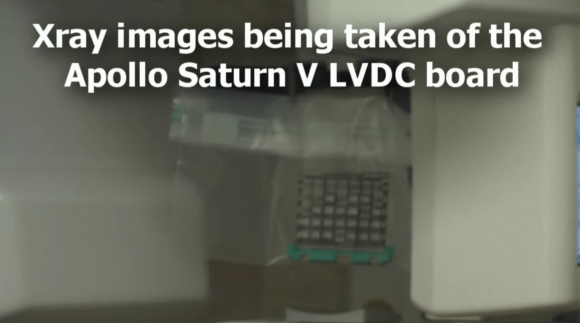
Join [Fran] as she dons the hat of an electronics archaeologist when looking at this vintage circuit board from the space race. As part of her personal collection she somehow acquired a Launch Vehicle Digital Computer board for a Saturn V rocket. This particular unit was never used. But it would have been had the Apollo program continued.
[Fran] is enamored with this particular board because she believes it is the forerunner of modern digital circuit design and layout. Since routing circuit boards is part of what she does for a living you can see why this is important to her. Also, who isn’t excited by actual hardware from the space program? We’ve embedded two of her videos after the break. In the first she shows off the component to the camera and speaks briefly about it. But the second video has her heading to the dentist’s office for X-rays. The image above is a rotating X-ray machine, but it looks like the best imagery comes when a handheld gun is used. They get some great images of the traces, as well as the TTL components on the board itself.
[Read more...]

Unsigned code running on Windows RT

unsigned-code-on-windows-rt
A crack has been found in the armor of Windows RT. This subset of Windows 8 is designed to run on ARM processors. The payload listed in the image above allows you to run unsigned desktop applications on the OS.
We haven’t seen very much about the Windows RT package, so it’s nice to hear [Clrokr's] thoughts on it. As far as he can tell the system has not been watered down from its Intel-aimed (x86) counterpart. Rather, RT seems to be a direct port with what is called “Code Integrity” mechanisms switched on. There is a kernel-level setting, barricaded behind UEFI’s Secure Boot, which determines the minimum software signing level allowed to run on the device. This is set to zero on a Windows 8 machine, but defaults to 8 on an ARM device. [Clrokr] uses a debugger to insert the code seen above into a DLL file in order to reset that minimum signing value to 0.
Do you have a project in mind for which this is useful? We’d love to hear about it in the comments!
[via Reddit]

Another take on the rear-window LED marquee

re-window-led-display
This rear-window LED marquee will help let the driver behind you know when you’re planing to change lanes or make a turn. But it also includes the ability to send a message like “Back Off!”. [Robert Dunn] was inspired to undertake the project after seeing the one we featured back in October. We’d say his has a better chance of being street legal since it uses all red LEDs.
The marquee is a matrix of 480 LEDs, all hand soldered to form the nearly transparent 48×10 grid shown above. This is important to preserve visibility out the back window of his truck. It makes us wonder about the feasibility of using SMD instead of through hole components. That would certainly make it even less visible when not illuminated, but the assembly process would be much more difficult. That’s because the 5mm LED packages fit nicely in the grid of holes he drilled in some plywood which served as the jig during soldering. The presence of leads also made the soldering process manageable.
Power to an Arduino board is provided from the cigarette lighter adapter. A set of six shift registers drive the columns while the rows are controlled by a 4017 decade counter and some transistors. Check out the blinker test video after the break to get a look at what this can do while on the road.
[Read more...]

Garage parking monitor guides you in every time

THEPARKINGSPOTTER2
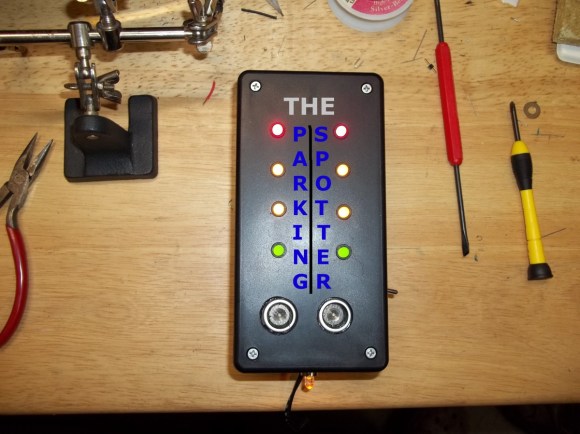
The live Adafruit Show and Tell stream from last weekend featured this project put together by [Silent Jeff]. He’s called “Silent” because when it came time to present his project on the show his microphone wasn’t working. As you can see in the video after the break, [PT] and [Ladyada] worked together to explain the project (of which they had no prior knowledge) using a game of charades. This is one of the follow-up images he sent them which details his parking spotter project.
[Ladyada] compliments [Jeff] on the finished look of the device and we agree. Not only does this do a great job of letting a driver know if they have pulled far enough into the garage, but it’s finished appearance ensures it won’t ever look out-of-place. The two silver discs near the lower end of the box are the sensors of an ultrasonic rangefinder. You mount this box so that the sensor is measuring distance between itself and the bumper of your vehicle. As the distance decreases the LEDs change to let you know when to stop. Inside the case you’ll find a voltage regulator and single-chip running the Arduino bootloader. [Jeff] says this is just his second Arduino project and we hope that at this rate we’ll be looking for big things from him in the not too distant future!
This is basically the same idea as cars that use parking assist sensors in the bumper. It’s just attached to the building instead of to the vehicle itself.
[Read more...]

New Year’s Eve countdown clock included SMS interactivity

interactive-sms-new-years-countdown
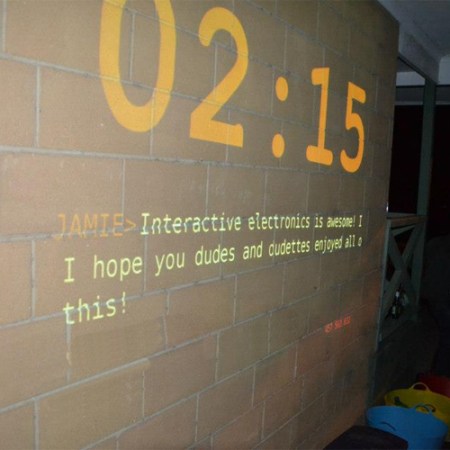
We remember several years back, when text messaging was first becoming popular, we went to a bar which had a huge television that would display text messages sent to a particular number. This sounds like a novelty, but in a large group of folks who know one another it’s the sandbox of social games. Wanting to tap in on that fun for his New Year’s Eve party, [James] built this countdown timer that includes an element of SMS interactivity.
The rig is projector based. A computer using Processing does the majority of the work but [James] needed a way to accepts text messages (the locale of the party had no Internet connection so this was the best bet). He grabbed a GSM shield and his Arduino Leonardo. The bulk of the evening the display showed the last few messages received, with a small countdown timer in the lower corner. As the countdown approached zero the time was given prominence as in the image above. We guess he was lucky to find a prepaid SIM card that allowed free incoming text messages. Our cell provider charges us 20¢ for each.
You might give this one a whirl next year. If it’s not quite your thing take a look around. We’ve seen a lot of fun setups like this mini ball drop.

Glass delay line slide used in an RGB lamp

glass-delay-lines-lamp
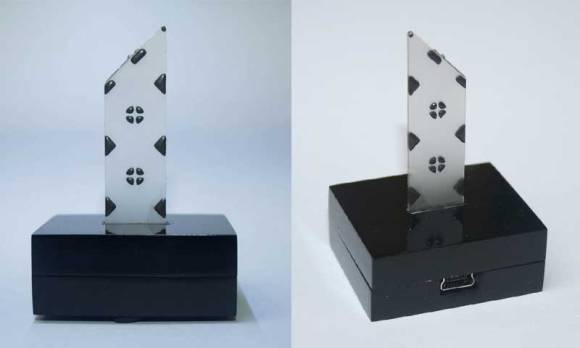
The spire used in this lamp is a part from an old television. It’s a glass delay line slide which pipes the light up from the Bluetooth controlled RGB lamp (translated) in the base.
We have looked at delay lines previously when [Dave Jones] tore down a camcorder to get at one. But we must have missed the EEVblog follow-up episode which explains how the glass slides work. The device uses physical distance to form a delay. Waves directed into the edge of the glass slide bounce around at an angle before being sensed at the collection point. [Lukas] liked the visual appearance of the part and decided to use it to add visual interest to his lamp project. The nature of the glass makes it perfect for directing the light up and away from the PCB.
The lamp consists of one RGB LED module controlled by an ATtiny2313 microcontroller. Also on board is a HC-05 Bluetooth module. This along with an app he wrote lets the user change lamp color and behavior wirelessly. You can see the lamp in action in the video after the break, but we think the camera shot probably doesn’t do it the justice it deserves.
[Read more...]

LED ice cubes prevent alcohol induced blackouts

cube
On November 23rd last year, [Dhairya] attended a little shindig at MIT. Three drinks into the night, he blacked out and woke up in the hospital the next day. It was an alcohol-induced blackout, and like all parties at MIT, there’s an ingenious solution to [Dhairya]‘s problem.
[Dhairya] came up with an alcohol-aware ice cube made of a coin cell battery, an ATtiny microcontroller, and an IR transceiver are molded into an edible gelatin ice cube. The microcontroller counts the number of sips per drink, and after one glass of adult beverage changes the color of the flashing LED from green to yellow. After two drinks the LED changes from yellow to red, signaling [Dhairya] to slow down.
If [Dhairya] feels the night is too young and keeps on drinking, the IR transmitter signals to his cell phone to send a text to a friend telling them to go take [Dhairya] home.
Less than three weeks after waking up in the hospital, [Dhairya] tested out his glowing ice cubes at another party. Everything performed wonderfully, even if he admits his creation is a little crude. A neat piece of work, and we can’t wait to see an update to this project.
[Read more...]